Tablet dashboard mounts: fit and charging-access checks
Updated · 8 min read
A tablet-sized opening is only the start. Check the actual charging plug, button access, removal movement and visual fit before ordering a dashboard bezel prototype.
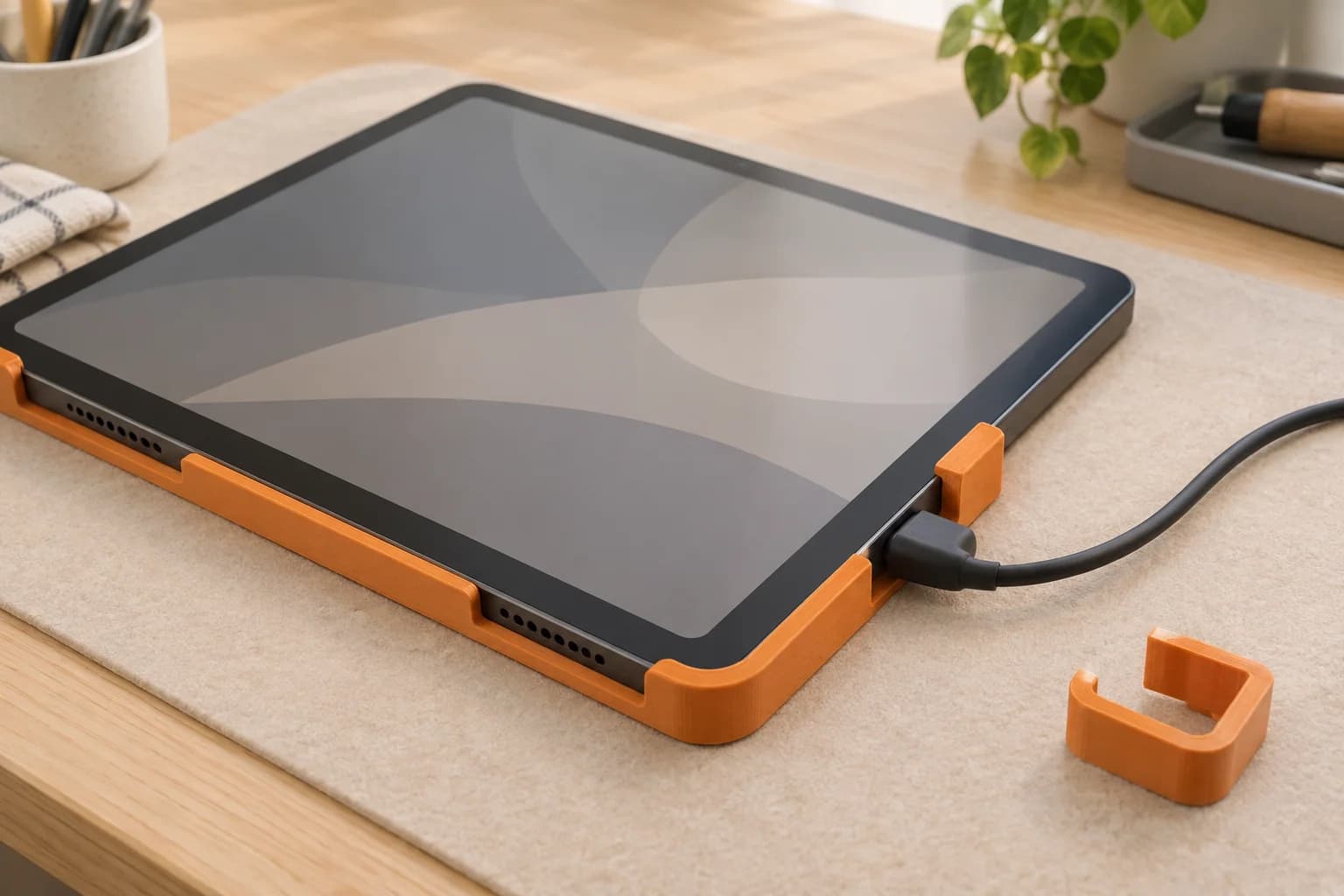
Test the exact tablet and the charging cable together before committing to a dashboard holder. A bezel can match the tablet's outline yet leave no room for the plug, cover a needed button, or make removal awkward.
For a home automation installer, a 3D printed fit prototype can answer those questions on a bench. It can also show whether the frame looks right beside the surrounding trim and controls. We keep that prototype work separate from the system used to attach an installed display.
Start with the tablet revision, then choose the file
“Ten-inch tablet” is a shopping description, not enough information to choose a model. Record the manufacturer, full model identifier and release year or generation. Add whether the case stays on and whether the dashboard will be portrait or landscape.
Apple's specifications show why the revision matters:
| Manufacturer specification | iPad, ninth generation | iPad, tenth generation |
|---|---|---|
| Body height × width × depth | 250.6 × 174.1 × 7.5 mm | 248.6 × 179.5 × 7 mm |
| Charging connector | Lightning | USB-C |
| Touch ID location | Home button | Top button |
These are Apple's nominal device dimensions and interface details, not clearances to add to a print. The change affects the body, charging opening and button access.12
Fire naming needs the same care. Amazon says the “10” in Fire HD 10 refers to screen size. The 2021 release is generation 11; the 2023 release is generation 13. Its identification instructions point to Settings → Device Options, then Device Model or About Fire Tablet.3
Keep a small fit record with the tablet identity, case, orientation, cable and model-file version. Compare the physical device with the supplied design, including any camera bump or case lip. If a creator lists one generation, treat that as the starting compatibility boundary. Scaling the whole file to accommodate another revision changes its other features too.
Give the plug room before hiding the cable
Inspect the cable you will actually use. “USB-C” identifies the connection; it does not tell you the shape of every surrounding plug body.
A useful charging check has four parts:
- Insertion: can the plug seat fully without hitting the frame?
- Plug body: is there room for its moulded shell and strain relief?
- Cable route: can the cable leave the opening in a relaxed curve, without being trapped?
- Disconnection: can you grip the connector and unplug it before removing the tablet?
Creator projects and commercial products make particular cable choices. Modo Tab Mount specifies a flat FPC cable with a choice of connectors. VidaBox's model-specific enclosure listing offers a right-angle USB-C cable and describes a rear cable pass-through.45 Those choices are a reason to inspect your cable, rather than proof that an ordinary cable will fit the same arrangement.
Hypothetical example: an installer finds a landscape bezel file for the correct bare tablet. The customer wants to keep a protective case, and their right-angle plug exits towards the frame's corner. The device fits without the case; the combined assembly does not. The next useful print is a revised charging-corner sample, if the design permits one, rather than another full bezel with unchanged geometry.
Record the collision clearly: “plug shell touches lower lip” is more useful than “tight fit.” Do not trim the moulded plug or force the cable into the opening. Change the geometry or choose a suitable cable, then repeat the check.
Decide which controls must stay reachable
Lay the tablet in the intended dashboard orientation and make an access map. Mark the charging port, power and volume controls, speaker and microphone openings, and any camera or sensor your setup uses. Apple's model-specific diagrams are a useful reference for locating the features on the two iPad generations above.12
Separate everyday access from service access. A power button might be rarely used, but the person maintaining the dashboard still needs a practical way to reach it. A camera opening matters only if the setup uses that camera. If a light sensor is part of your dashboard behaviour, check the actual device's response with the proposed bezel; an attractive opening alone does not settle that question.
Also check the fingers using the screen. Can someone tap controls near the edge without rubbing a raised lip? Does the frame obscure any active display area? Does insertion press a button? Include actual vents where the device has them, rather than assuming every tablet has the same cooling layout.
A model with fewer cut-outs can look tidier. Decide what each covered feature means before accepting that appearance.
Rehearse removal on a protected bench
The exit movement deserves as much attention as the final seated position. Identify how the design opens: sliding, lifting, releasing a bezel, or another documented sequence. Then check the space needed around it.
The following is a practical review method we suggest, not a manufacturer test protocol. Keep the tablet supported on a padded bench and move it gently; a fit sample is not a suspension test.
| Check | Observation to record | Reason to revise |
|---|---|---|
| First insertion | Where the tablet touches, and whether it seats without force | Binding, a forced button, or contact with the active screen |
| Charging connection | Plug seating, shell clearance and cable direction | Partial insertion, side pressure or a pinched cable |
| Finger access | Whether the connector and release features can be reached | Removal requires pulling on the cable or prying against glass |
| Exit movement | The required slide or lift, including unplugging | The frame or nearby object blocks the movement |
| Repeat handling | Any new marks, loosening or visible damage after gentle removal | Scraping, a cracked feature or a fit that changes |
Write down the unplugging sequence. “Disconnect, lift, then slide” is a more useful handover note than “removable.” If a release requires a tool, identify its access point without improvising leverage against the tablet.
A small corner or charging-opening coupon can answer a narrow fit question when your design supports it. A full bezel mockup answers a different question: how the assembly looks and feels as a whole.
Check the view from the room
Review the mockup from the distance at which someone will normally see it. Compare border width, corner shape, visible cable, colour and the frame's apparent depth. A close-up can miss an awkward cable loop that is obvious from the doorway.
Use photographs to record appearance and bench checks. Review the intended location separately for space around the screen, without treating a prototype placed against a wall as an approved installation. Keep appearance notes separate from fit notes so the next revision has a clear purpose: a slimmer border, a different cable exit, or more finger access.
Treat charging, material and attachment as separate decisions
A material choice does not settle the charging arrangement. Apple instructs users to keep the iPad, USB cable and power adapter in a well-ventilated area during use or charging.6 Follow the guidance for your actual device and charger when assessing an enclosure.
For the prototype, write down the environment you want to represent: direct sun, nearby heat, contact pressure and repeated removal. Prusa describes PLA as useful for quick prototypes with modest resistance demands, while its PETG guidance describes a technical material with good temperature resistance and layer adhesion.78 These broad descriptions help screen a material choice; they do not establish a finished holder's performance.
Choose from the stock shown in the ordering flow. Our replacement-part guide explains the wider fit, material and slicing checks.
For an installed wall dashboard, use a manufacturer-specified mount and attachment system matched to the tablet and location. As one example of the details to look for, VidaBox's listing states compatible and incompatible models and describes button access, protective interior pads and removal features.5 Check the manufacturer's current instructions for the chosen attachment and surface. A commercial dock is also worth considering while the dashboard location is still undecided.
Prepare an authorized prototype for printing
Check the rights on the hardware file before preparing an order. Modo Tab Mount illustrates a common trap: its software has an MIT licence, but the hardware designs have CC BY-NC 4.0 terms, and its README expressly excludes commercial manufacturing or resale.4 The Creative Commons deed restricts commercial use.9 A repository's software licence does not clear its model files for paid printing.
Use your own design, a file with suitable reproduction rights, or permission from the rights holder. Our downloaded-model guide covers the checks to make.
At 3dPrintsToronto, the core upload path accepts authorized, compatible pre-sliced .3mf or .gcode files. An STL needs preparation first; follow the STL-to-print-ready guide, then the plate export instructions. An unsliced .3mf may offer opt-in auto-slicing, subject to availability.
You or your designer should resolve geometry changes before reslicing. Inspect thin lips, support contact and the charging opening in the sliced preview. When the file is ready, upload the prototype, review the parsed details and choose stocked material. Free scheduled Toronto pickup is the default; choose Canada Post shipping if the order offers it.
For smaller devices in the same installation, use the sensor-stand and open-cradle checks to review sensing openings and placement as well as housing fit.
After accepting a particular tablet and cable combination, use the repeat-accessory batch record to keep that combination attached to later copies.
If separate tabletop leads also need organizing, the network and AV cable-comb guide distinguishes removable dressing tools from separators that remain around the cables.
Questions before ordering
Will a mount for another tablet generation fit?
Compare the exact models rather than assuming it will. Body dimensions, connectors and button locations can change, as the iPad comparison shows.12 Check the real tablet, its case and the specific file.
Does a USB-C opening fit every USB-C cable?
The opening still needs to accommodate your plug shell, strain relief and cable route. Seat the actual connector and rehearse unplugging it while the tablet is supported. Do not rely on the connector name alone.
Can I leave the tablet charging inside a printed bezel?
Follow the tablet and charger's manufacturer guidance. Apple specifically calls for ventilation during use or charging.6 A successful bench-fit check answers a geometry question; it does not validate an enclosed charging arrangement.
Can we print a downloaded tablet mount file?
We can consider an authorized, compatible prototype file within our service scope. Check the model's licence and any dependencies or remixes, then prepare the sliced file. Printing does not include CAD design or installation; our terms set out the service boundary.
Sources checked
Apple, iPad ninth-generation technical specifications. Dimensions and interface locations; verified: 2026-10-05.
Apple, iPad tenth-generation technical specifications. Dimensions and interface locations; verified: 2026-10-05.
Amazon, Fire tablet specifications overview. Naming and device identification; verified: 2026-10-05.
Return to text: 1
modo-co, Modo Tab Mount repository. Cable choices and separate hardware/software licences; verified: 2026-10-05.
VidaBox, model-specific removable tablet enclosure. Compatibility, cable and access features; verified: 2026-10-05.
Apple, Important safety information for iPad. Charging and ventilation guidance; verified: 2026-10-05.
Prusa Research, PLA material guidance. Prototype suitability and resistance limits; verified: 2026-10-05.
Return to text: 1
Prusa Research, PETG material guidance. General technical-material properties; verified: 2026-10-05.
Return to text: 1
Creative Commons, CC BY-NC 4.0 deed. Commercial-use restriction; verified: 2026-10-05.
Return to text: 1
Have a sliced file ready?
Upload it for an instant quote in CAD.